|
|
|
Musicnizer 8.0 |
 |
| License : |
Shareware |
| Release : |
[!] It is now possible to specify, whether a particular artist is a band or a person. [!] For bands, members can be listed. For persons, you can add all bands the person participated in. |
| Price : |
$39.95 US |
| Language : |
English,Arabic,Bulgarian,Danish,French,German,Hebrew,Italian,Polish,Russian,Serbian |
| File Size : |
17.926 MB |
|
|
|
|
|
Click to enlarge image
|
Description :
A song library today may consist of Audio CDs, Audio DVDs, vinyl discs, audio files in a popular format, like MP3, WAV, APE, FLAC etc. Whereas this variety is not always represented in a single library, it offers a clue how complex the problem of managing audio may be.
That is where a smart music organizer may turn to be quite handy.
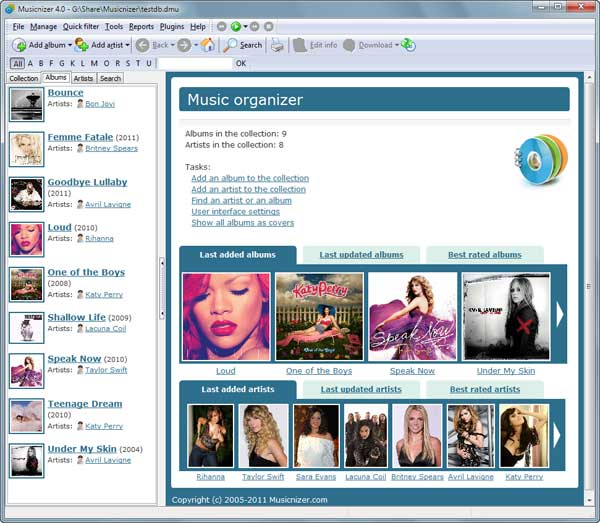
Musicnizer browses your collection of audio files and generates a song index with data about every album and artist. Necessary details can be extracted from ID3 tags of the files. The organizer can also fetch album art, track info, genre, year, label, album review, and further info.
With a song library that consists of physical media (like vinyl records, or CDs), you can try another method of entering data into Musicnizer. The program supports all types of USB barcode readers and portable scanners like Opticon OPN-2001. Simply scan barcodes off your album cases, and Musicnizer will automatically find details of the album on the internet.
For those who do not have any barcode scanners Musicnizer offers a unique function: it can scan barcodes using a web camera!
Yet another method to add an album is just putting its name into the program.
Unlike other music organizer tools, Musicnizer offers pretty much data about artists. At your request it will fetch basic info, biography, discography, pictures. All items are represented as links, so simply click an album in a discography to proceed to its page. A click on a genre will get all albums of this genre from your catalog.
Once entered, all data from the music collection can be easily sorted and filtered. Reports will export or print any details of your library. The loan manager is quite useful for those who give their CDs to friends.
The numerous features of Musicnizer can be further extended with various plugins.
Try it now, collect your audio with fun!
More information from program website
|
| Checkout these similar programs : |
|---|
| | MP3 Workshop 4.80 | | | mp3 editor,mp3 splitter,mp3 joiner,cd ripper,mp3 converter,all-in-one. | Shareware
| |
| | MP3 Workshop XP 4.50 | | | All-In-One audio editing software with cd burning,mp3 cd ripper,mp3 editor | Shareware
| |
| | Tag&Rename 3.9.3 | | | Mp3/mp4 music organizer: easily handles all popular digital audio files tags. | Shareware
| |
| | Music Tag Editor 2.0 | | | Simple-to-use tag editor with UNICODE support, playlist and filelist generator. | Shareware
| |
| | | | MP3 Sorter 1.2.0.68 | | | New software for organizing and renaming your MP3 collection automatically. | Shareware
| |
| | Audio Catalog 4.7 | | | Audio Catalog is a music manager that helps you organize your music collection. | Shareware
| |
| |
|
|